
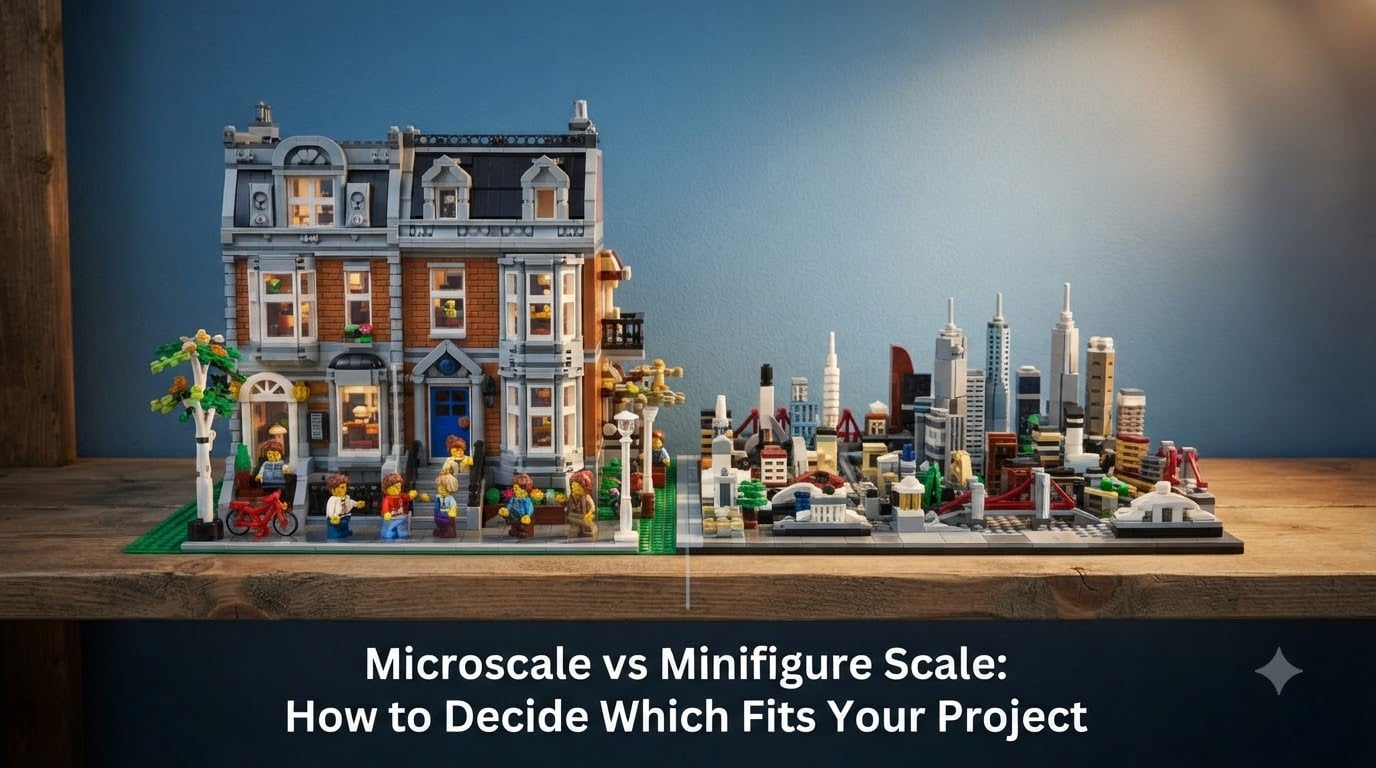
I built my first city layout using whatever scale felt right, then watched minifigures tower over cars and crumble next to buildings. That is the moment every LEGO builder hits: you need to understand scale before the build starts.
The choice between microscale vs minifigure scale shapes everything from part count and display space to playability and cost. Our team has built dozens of MOCs across both scales over the past five years, and the difference between a coherent scene and a chaotic one almost always comes down to picking the right scale early.
This guide gives you the technical foundation, a side-by-side comparison, and a project-based decision framework so you can stop guessing and start building with confidence. Whether you are designing a sprawling city, a single shelf display, or your first Star Wars MOC, you will walk away knowing exactly which scale fits your project.
Table of Contents
Understanding LEGO Building Scales: The Foundation
Scale in LEGO building means the ratio between your model and the real-world object it represents. When everything in your scene shares the same scale, your brain reads it as a place rather than a pile of plastic.
LEGO scale works on a stud-based measurement system. A standard stud is 8mm wide, a brick is 9.6mm tall (without the stud), and a plate is 3.2mm tall. These three numbers form the backbone of every scale calculation you will ever do.
Most hobby scales use ratio notation like 1:38, meaning 1 unit in your model equals 38 units in real life. A 1:38 car is 38 times smaller than the real vehicle. LEGO does not enforce an official scale, but the community has settled on a handful of popular ratios that work with the brick dimensions.
Why does scale matter so much? When you mix scales accidentally, the illusion breaks immediately. A minifigure at 1:38 standing next to a 1:200 building looks like a giant in a toy town. A 1:100 car parked next to a 1:38 house looks like it swallowed a growth pill. Consistency is the price of realism.
What Is Minifigure Scale? The Popular Standard
Minifigure scale, also called minifig scale, is the standard most LEGO sets use because it is built around the iconic 4cm-tall minifigure. The ratio runs roughly 1:38 to 1:45, with 1:42 being a common sweet spot for architectural accuracy.
At 1:42 scale, one stud equals about 0.84 feet in real life. A 6-stud-wide car represents a vehicle about 5 feet wide. A 8-stud-wide car stretches to roughly 6.7 feet, closer to a real-world compact sedan. That is why Speed Champions cars shifted from 6-wide to 8-wide over the years, more studs meant more accurate proportions.
Buildings at minifig scale use roughly 6 bricks per floor, giving each story about 5.7 feet of ceiling height. A standard LEGO modular building stands 32 bricks tall, representing a three-story structure around 32 feet in real life. Doors sit about 8 bricks tall to clear a minifigure head, and windows span 4 studs wide for proper proportion.
Minifigure scale gives you full playability. Your minifigures can sit inside cars, walk through doorways, and pose on balconies. You get interior detail, furniture, and accessories. The tradeoff is part count and shelf space. A single modular building can run 2,000 to 4,000 pieces, and a city block adds up fast.
What Is Microscale? The Smaller Alternative
Microscale refers to any LEGO scale smaller than minifigure scale, typically 1:100 or beyond. The most common microscale ratios fall between 1:200 and 1:300, with some builders pushing to 1:400 or even smaller for massive city skylines.
At microscale, one stud represents 2 to 3 feet in real life rather than the roughly 0.8 feet of minifig scale. A microscale house might be 20 studs long and 15 studs tall, representing a 40-foot by 30-foot two-story home. The same house at minifig scale would balloon to 50 studs long and 40 studs tall.
Microscale works because it trades detail for size. You lose the ability to fit minifigures inside buildings. Windows become single tiles or printed slopes. Doors become 1×2 bricks in contrasting colors. Interior detail disappears entirely. What you gain is the ability to build an entire downtown skyline on a single shelf.
Our team built a microscale city of 50 buildings using about 8,000 parts. The same city at minifig scale would have demanded 40,000 parts and a dedicated table. Microscale is the right call when you want scale and scope over interior playability.
Microscale vs Minifigure Scale: Side-by-Side Comparison
Here is how the two scales stack up across the dimensions that matter most for your build.
Part count: Microscale wins by a wide margin. A microscale building uses 100 to 300 parts. The same building at minifig scale runs 1,500 to 3,000 parts. For a 20-building city, that is a difference between 4,000 parts and 50,000 parts.
Display space: Microscale builds fit more scene into less room. A 4-foot shelf holds a microscale skyline of 30 buildings. The same shelf fits 5 to 7 minifig-scale modulars. If shelf space is your bottleneck, microscale delivers more visual impact per square inch.
Detail level: Minifigure scale wins here. You can add furniture, minifigures, interior lighting, and fine exterior details like awnings and signage. Microscale relies on shape, color, and silhouette rather than fine detail.
Cost: Microscale costs less for equivalent coverage. The 50-building microscale city cost our team about $400 in parts from BrickLink. A 7-building minifig-scale city covering the same real estate would run $1,200 to $1,800.
Build time: Microscale builds faster because each building takes 2 to 4 hours. Minifig-scale modulars run 15 to 40 hours each. Microscale lets you iterate and revise without sinking a full weekend into a single structure.
Playability: Minifigure scale is the only choice if play matters. Minifigures fit inside, can grip accessories, and move through scenes. Microscale is display-only by definition.
Project-Based Scale Decision Framework
Match your project to the scale that serves its purpose. Here is the framework our team uses when planning a new MOC.
City Layouts and Skylines
Choose microscale for any city larger than 10 buildings. The math is simple: a minifig-scale city of 20 buildings costs more than most builders want to spend and fills a room. Microscale gives you the skyline feel without the footprint or the price tag.
Modular Buildings and Detailed Displays
Choose minifigure scale when each building is a star. The official LEGO Modular Building Collection works at this scale because the goal is detailed interiors, removable floors, and minifigure scenes. If you want to peek inside and arrange furniture, minifig scale is the only path.
Vehicles: 6-Wide vs 8-Wide
Minifigure scale handles vehicles at either 6 studs wide or 8 studs wide. 6-wide is chunkier and more stylized. 8-wide matches real-world proportions better and fits two minifigures side by side. Speed Champions used 6-wide historically and shifted to 8-wide in recent years.
Microscale vehicles work as part of a city or as display pieces but lose playability. A 1:200 car cannot hold a minifigure.
Space Ships and Star Wars Models
Most UCS (Ultimate Collector Series) Star Wars sets run slightly larger than minifig scale, around 1:24 to 1:33, because the source vehicles are fictional and have no fixed real-world size. Microscale works for fleet displays where you want to show many ships together.
Rivendell (set 10316) uses a scale closer to minifig, around 1:40, but compresses some dimensions to keep the build manageable. It is not pure microscale, it sits in a hybrid zone built for display impact.
Architecture and Real-World Buildings
The LEGO Architecture line uses a scale around 1:200 for skylines (1:600 for very tall towers) and roughly 1:150 for the standalone building sets. These are microscale ratios designed for shelf display and accurate proportions.
Dioramas and Scenes
Match scale to your scene size. A battle diorama with 5 vehicles and 20 minifigures works at minifig scale. A city diorama showing 50 buildings and traffic flow works better at microscale. Mixing scales in one diorama usually breaks the illusion.
Common Scale Mistakes and How to Avoid Them
Forum threads on r/lego and r/legodnd reveal the same scale mistakes over and over. Here is how to avoid them.
Mistake 1: Mixing scales accidentally. Builders grab a microscale building from one project and drop it into a minifig-scale city. The eye catches it immediately. Pick one scale per scene and stick to it.
Mistake 2: Underestimating part count at minifig scale. A minifig-scale house that looks simple in your head can easily reach 2,000 parts. Build a small prototype first, count the parts, then multiply by the number of structures in your plan.
Mistake 3: Choosing minifig scale for a shelf display. If your display shelf is 4 feet wide and you want a city, microscale is the only realistic option. Minifig scale forces you to pick one or two buildings and leaves the shelf looking sparse.
Mistake 4: Losing detail at microscale. Microscale buildings can look like generic blocks if you skip color variation and roof shapes. Use SNOT techniques (studs not on top) and varied brick profiles to add visual interest.
Mistake 5: Ignoring back-side detail. At minifig scale, the back of a building is visible and needs a wall. Builders often forget this and leave studs exposed. Plan a back wall or position the building against a wall.
Sign you chose the wrong scale: If you find yourself skipping details because there is no room, you probably should have built microscale. If you find yourself staring at empty shelves because you cannot fit enough buildings, you should have gone minifig scale and accepted fewer structures.
Scale Math Made Simple: Calculate Your Own
Calculating scale is straightforward once you know the stud measurement. Here is the formula and three worked examples.
The formula: Real-world feet = (studs × 0.0833) × scale ratio. For a 1:38 scale, one stud equals about 0.83 feet. For a 1:200 scale, one stud equals about 4.4 feet.
Example 1: A 6-wide car at minifig scale (1:38). 6 studs × 0.83 feet per stud = 5 feet wide. That matches a real compact hatchback.
Example 2: A 30-stud-long microscale building at 1:200. 30 studs × 4.4 feet per stud = 132 feet long. That is a commercial building or a row of townhouses.
Example 3: An Empire State Building replica at 1:1500. The real building is 1,454 feet tall (including the antenna). 1,454 ÷ 1500 = 0.97 feet, or about 11.6 inches tall in your model. The LEGO Architecture Empire State Building set comes in at 7 inches, which is close to 1:2000, a more compressed microscale.
For quick reference, here are the most common LEGO scales and their stud-to-foot conversions:
- 1:38 (minifig scale): 1 stud = 0.83 feet
- 1:42 (minifig scale, common): 1 stud = 0.92 feet
- 1:48 (minifig scale, US architectural): 1 stud = 1.0 feet
- 1:100 (microscale): 1 stud = 2.1 feet
- 1:200 (microscale): 1 stud = 4.2 feet
- 1:300 (microscale): 1 stud = 6.3 feet
- 1:600 (microscale skyscrapers): 1 stud = 12.5 feet
Mixing Scales: When It Works and When It Breaks
Mixing scales is the fastest way to ruin an otherwise good build. But there are a few exceptions where it works intentionally.
Speed Champions cars (around 1:40) coexist with minifig-scale city buildings (1:38 to 1:45) because the ratios are close enough that the eye accepts them as the same scale. The 10 to 15 percent size difference is invisible at shelf distance.
Microscale buildings (1:200) next to minifig-scale buildings (1:42) never work. The size difference is nearly 5x, and your brain reads it as a city of giants and shrunken houses.
If you want to display a microscale city alongside a minifig-scale modular building, put them on separate shelves at least 6 inches apart, or place the microscale city on a raised platform so it reads as background scenery rather than competing scale.
Frequently Asked Questions
What is the difference between microscale and minifigure scale?
Microscale is any LEGO building scale smaller than minifigure scale, typically 1:100 or beyond, where models are built much smaller than real-world proportions to fit more detail in less space. Minifigure scale is the standard ratio of roughly 1:38 to 1:45, built around the 4cm-tall minifigure, where one stud equals about 0.8 to 0.9 feet in real life.
What is the difference between LEGO minifigures and microfigures?
LEGO minifigures are the standard 4cm-tall characters with moving arms, legs, and gripping hands. Microfigures are smaller printed characters used in microscale builds, standing about 1cm tall with no articulation. Microfigures exist purely for scale reference in microscale scenes, while minifigures are the playable standard for minifig-scale builds.
What scale is microscale?
Microscale in LEGO covers any ratio smaller than 1:48, with the most common microscale ratios falling between 1:100 and 1:300. Some builders push to 1:400 or smaller for massive city skylines and detailed architecture displays.
Is LEGO Rivendell microscale?
LEGO Rivendell (set 10316) sits in a hybrid zone, slightly larger than pure microscale at roughly 1:40, but compresses some dimensions to keep the build manageable. It is built for display impact and does not match standard minifig-scale buildings exactly.
Can minifigures fit in microscale builds?
No. Standard minifigures are too large for microscale builds because microscale windows and doors are typically 1×1 or 1×2 studs, far smaller than the minifigure body. Microfigures or printed tiles are used for scale reference instead.
What scale should beginners start with?
Beginners should start with minifigure scale because it offers more forgiveness on proportions, full playability, and a huge library of reference sets and instructions. Microscale requires more precise planning and SNOT techniques that beginners often find frustrating.
Conclusion: Choosing Between Microscale vs Minifigure Scale
The microscale vs minifigure scale decision comes down to what you want from your build. Choose minifigure scale if playability, interior detail, and iconic minifigure scenes matter most. Choose microscale if you want to cover more ground, fit a city on one shelf, and keep part counts manageable.
Start with your project goal. A detailed modular building with furnished rooms belongs at minifig scale. A 30-building skyline belongs at microscale. A single Star Wars ship can work at either, depending on whether you want minifigures inside the cockpit or a fleet display.
Pick your scale, build a small test section to confirm the proportions feel right, and then commit. Consistency across your scene is what separates a believable LEGO world from a pile of bricks.