
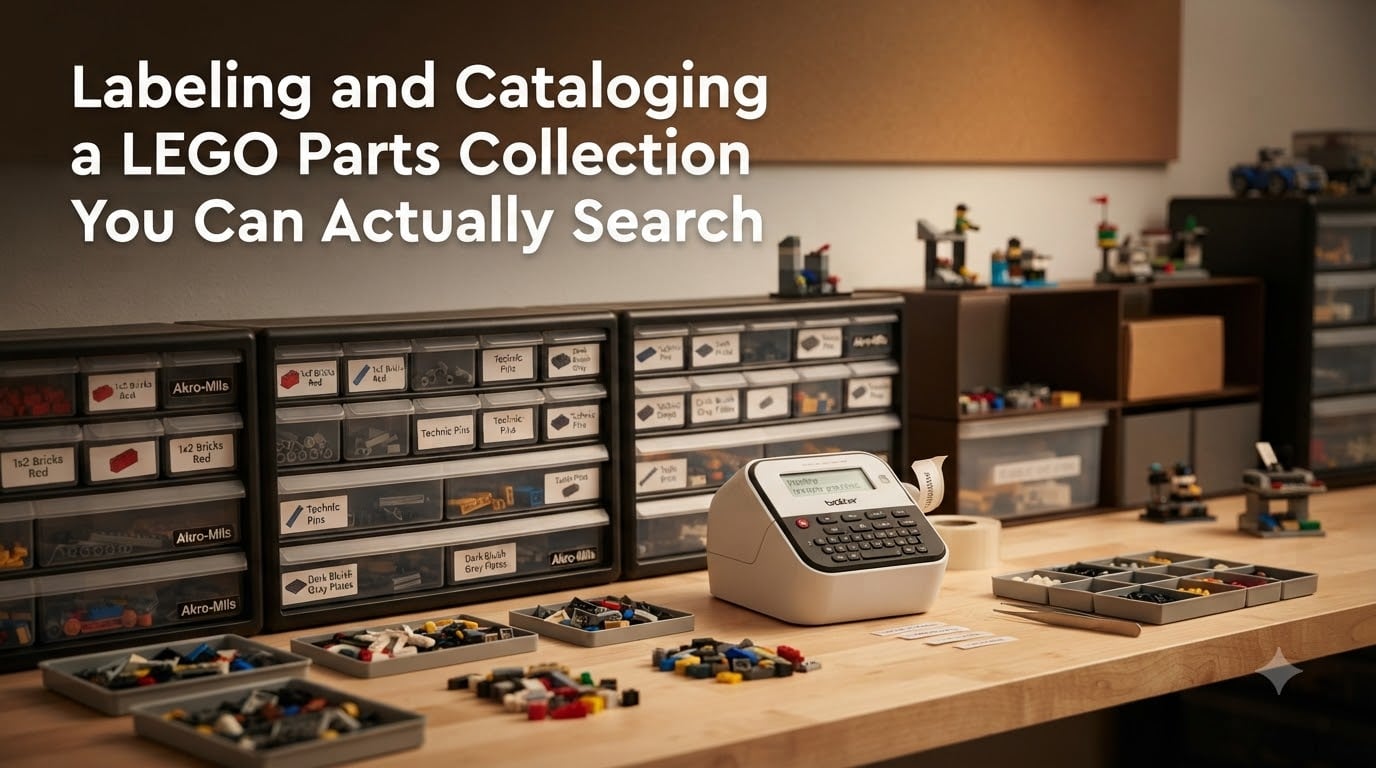
I have spent more evenings than I care to admit digging through plastic bins of black bricks, hunting for one specific 2×4 plate. That frustration is exactly why I started labeling and cataloging my LEGO collection, and it is the reason this guide exists. Below I will walk you through the exact system I use to turn a chaotic pile of loose LEGO into a searchable library you can query in seconds.
Labeling and cataloging a LEGO parts collection you can actually search is the process of combining physical labels, sorted storage, and a digital database so you can find any piece on demand. Done right, it saves hours per build, lets you know what you own before buying duplicates, and turns your collection into a resource instead of a storage problem. In this guide I will cover assessment, sorting decisions, labeling methods, catalog software, storage solutions, and the long-term habits that keep everything working.
Table of Contents
Getting Started: Assess Your Collection Before You Touch a Single Brick
The single biggest mistake I see new catalogers make is jumping straight into sorting bins. I did it too. After two wasted weekends I learned that a 30-minute assessment saves 30 hours later. Before you sort a single piece, get a clear picture of what you actually own and what you want to accomplish.
Estimate Collection Size Realistically
Most people dramatically underestimate their collection size. A single LEGO set can contain 1,500 pieces, and a household collection often runs 20,000 to 100,000 pieces once you factor in sets you have disassembled. Weighing your loose bricks is the fastest method. A standard 2×4 brick weighs about 2.5 grams, so dividing total weight by 2.5 gives a reasonable estimate. I weighed my own collection at 47 kg, which translated to roughly 18,800 pieces within 5% accuracy.
Do not worry about being exact at this stage. You just need a ballpark so you can plan storage and time investment properly.
Define Your Goal: MOC Building, Reselling, or Pure Inventory
The catalog structure that works for a MOC (My Own Creation) builder is very different from one designed for a BrickLink seller. Builders need fast access to specific parts by element ID. Sellers need accurate counts and condition notes. Pure collectors often want a beautiful visual record. Pick one primary goal, and your system will be far simpler to design.
I identify as a MOC builder first, which means my system prioritizes element IDs and quantity over color photos. If I were running a BrickLink store, I would add a condition field and pricing notes to every record.
Choose a Counting Method That Does Not Drain Your Willpower
One forum user on r/LegoStorage reported spending two full months counting 60,000 pieces manually, one row at a time. That is dedication I do not have. If you are starting from zero, plan to count in short sessions of 30 to 60 minutes, and accept that you will not finish in a weekend. The goal is a useful catalog, not perfection.
Sort by Type or Sort by Color: The Core Decision
This is the question that sparks the most debate on every LEGO forum. The short answer is that for searchability, sorting by type wins almost every time. Here is the longer answer based on my testing across three different systems.
Why Sorting by Type Beats Color for Searchability
When you start a build, you almost never think, “I need a lavender piece.” You think, “I need a 2×4 brick.” Sorting by type means every 2×4 brick in every color lives in one place or in clearly marked sub-categories by color. When you search for that 2×4, you find it instantly.
Color-first sorting feels satisfying at first because bins look pretty. But the moment you need a specific piece in any non-red color, you are stuck opening every drawer in a color family. The community at r/LegoStorage consistently recommends type-first sorting for exactly this reason.
When Color-First Sorting Actually Makes Sense
Color-first sorting works for small collections under 2,000 pieces where you mostly build sets rather than MOCs. It also works for specialty collections like a parts palette for mosaic art. If either of those describes you, color sorting can be faster to set up. Just know that as your collection grows, you will probably migrate to type-first eventually.
The Hybrid System Experienced Collectors Use
My current system uses a type-first hierarchy with color as a secondary sort within each category. For example, my 2×4 brick drawer is subdivided into 12 small bins, one per common color. This gives me both searchability by type and the visual organization that makes restocking easy. It takes more upfront work but pays off forever.
The 5/2 Rule and Other Counting Shortcuts That Save Hours
Before we get into catalog software, let me address the most-asked LEGO counting question online. The 5/2 rule is a simple mental shortcut that speeds up how you estimate quantities.
What the 5/2 Rule Means in Practice
The 5/2 rule means you count pieces in groups of five, and any leftover pieces you estimate as groups of two. Once trained, you can scan a pile of bricks and quickly arrive at a count that is accurate within 10%. For large quantities this is far faster than counting individually, and for inventory purposes that level of accuracy is more than enough.
The rule works because your brain can easily recognize five pieces laid out in a row, and most loose piles end up in clusters of even numbers once you jostle them around.
Rows of Five for Manual Counting
When you need a precise count, line pieces up in rows of five. One BrickNerd user documented counting 60,000 pieces this way, taking about 15 seconds per row. Multiplied out, that is roughly 250 hours of work, which is why I strongly recommend only fully counting your most-used parts.
Weighing Bulk Quantities as a Faster Alternative
For parts you own in the hundreds, weighing is faster than counting. Calibrate a small kitchen scale with 10 pieces of a given element, then weigh the full batch. Divide and round. This is what most BrickLink stores with massive inventories actually do, and it cuts counting time by 90%.
Physical Labeling Systems That Actually Stay Stuck
Labels are the bridge between your physical storage and your digital catalog. A drawer without a label is a future you will resent. Here are the three labeling approaches I have tested, ranked by durability.
Brother P-touch and Thermal Label Printers
The Brother P-touch series is the gold standard for LEGO labeling. The laminated TZe tapes resist finger oils, water, and the occasional drop, which matters when you handle bins constantly. The PT-D210 handles most home collections for under $50, while the PT-H110 adds Bluetooth for printing from your phone.
The main advantage is on-demand printing. Find a new part, type the label, peel, stick, done. No re-printing whole sheets because you added one bin.
Printable Sheet Labels from Brick Architect and Friends
For a budget-friendly alternative, Brick Architect offers free printable labels for over 5,000 LEGO elements. You print a full sheet on regular paper or sticker paper, then cut and apply. This works well for setting up a large system at once, but adding new labels means printing another sheet.
I started with printed sheets and migrated to a Brother P-touch after six months. The flexibility won me over. If you want to start free, printable sheets are a great entry point.
Hand-Labeled Systems for the Budget-Conscious
If you have masking tape and a Sharpie, you have a working label system. It will not look pretty, and the tape will need replacing every few months, but it costs nothing. Several longtime collectors on Eurobricks still use this approach because it forces them to be deliberate about what deserves a bin.
Label Format Standards Every Drawer Should Follow
Every label in my system includes three pieces of information: the element name, the element ID (or design number), and the dominant color. For example, a drawer reads “Brick 2×4 | 3001 | Black.” The element ID is what makes the system searchable in Rebrickable and BrickLink, and the color prevents mix-ups when bins are stacked.
Digital Cataloging: Choosing Software That Makes Your Collection Searchable
Physical labels answer “what is in this drawer.” Digital catalogs answer “what do I own total.” You need both. Here is the honest comparison I wish someone had shown me when I started.
Rebrickable for Builders and MOC Creators
Rebrickable is free for personal use and built around element IDs, which makes it the most searchable LEGO database on the internet. You can upload a parts list, assign sets to specific builds, and even see which MOCs you can build with what you own. This last feature alone has saved me from buying duplicate sets.
The downside is the upload process. For very large collections it is faster to use their bulk import tools or to export a list from another program. For collections under 50,000 pieces, manual entry is manageable in 10 to 20 hours.
BrickLink Studio for Sellers and Resellers
BrickLink Studio is free software from LEGO for designing builds, but its sister site, BrickLink Marketplace, is where sellers manage inventory. If you ever plan to sell parts, BrickLink is the standard. Their catalog includes every element with consistent color names and condition grading.
For pure cataloging without selling intent, BrickLink is overkill. For sellers, it is non-negotiable.
BrickOgnize for AI Photo Identification
BrickOgnize is a relatively new app that identifies LEGO pieces from photos. I tested it on a handful of printed and stickered parts that I could not identify by sight, and it correctly named 8 out of 10. The app is especially helpful for minifig accessories and rare printed tiles that do not appear in standard catalogs.
For bulk identification it is too slow, but for mystery parts it is the fastest option available.
Spreadsheet Workflows When You Want Full Control
Some collectors, including me for two years, prefer a Google Sheet or Excel file. You control every column, every tag, every formula. You can add custom fields like “drawer location,” “purchase set,” or “MOC use.” The trade-off is no automatic integration with LEGO databases, so you enter element IDs and color names by hand.
If spreadsheets appeal to you, at minimum include these columns: element ID, element name, color, quantity, location, and notes.
Building a Searchable Database That Goes Beyond a Spreadsheet
The difference between a list and a searchable database is metadata. Anyone can write down parts. Few people add the fields that make the list actually queryable. Here is the structure I landed on after three iterations.
Use Element IDs, Not Just Part Names
An element ID (also called a design number) is the unique identifier LEGO assigns to each part. The 2×4 brick is element 3001. The 1×1 round plate is element 4073. Element IDs never change, even when LEGO retires a part. Names do change (“Lavender” became “Medium Lavender” in 2004). If you want a catalog that survives the next decade, anchor everything to element IDs.
Add Color, Quantity, and Location to Every Record
Every row in my catalog includes element ID, color name, color code, quantity, drawer location, and last updated date. That is six fields, and together they answer every question I have ever asked: What do I own? Where is it? How many? When did I last verify the count?
Tagging and Notes for Non-Standard Pieces
Printed tiles, stickered parts, and chrome elements need extra fields. I added a “special” column with tags like “printed,” “stickered,” “chrome,” and “unique.” When I search for printed 1×1 tiles, the tag filters the catalog instantly.
Search by Image, Color, or Part Number
A searchable catalog means you can query by image, color, or part number and get results in seconds. Rebrickable and BrickLink both support image-based search, which is how I confirm that a piece in my hand matches a piece in my catalog. Color search is most useful for MOC builders matching a specific palette. Part number search is the daily workhorse for me.
Storage Solutions That Match Your Sorting System
Your labels and catalog only matter if the storage supports them. Here are the three systems I have used, plus the one I recommend for new collectors.
Akro-Mils Drawer Cabinets
The Akro-Mils 44-drawer cabinet is what you see in almost every serious LEGO room photo online. Each drawer holds roughly 200 to 400 pieces depending on size, the cabinets stack, and the drawers pull out fully. They are not cheap, but they last decades. I have eight cabinets and regret nothing.
IKEA Trofast for Budget Sorting
The IKEA Trofast system is the most-mentioned storage solution on r/LegoStorage. It costs a fraction of Akro-Mils, the bins come out for easy access, and the frame is sturdy. The downside is the bins are not enclosed, so dust becomes a real issue. I keep my Trofast bins inside a closed cabinet to manage this.
Shoe Box and Craft Box Alternatives
For very small collections, plastic shoe boxes from a dollar store work surprisingly well. They stack, they are transparent, and they cost almost nothing. I started with 12 of these and only upgraded to Akro-Mils after my collection passed 8,000 pieces.
Maintenance: How to Keep Your Catalog and Labels Useful Long-Term
A catalog that you abandon in three months is worse than no catalog at all, because you remember it exists and feel guilty. Here are the three habits that keep mine useful.
The Build-and-Restock Habit
Every time I finish a build, I update my catalog with the parts I used. This takes 5 to 15 minutes depending on the build, and it keeps my inventory accurate. Without this habit, my catalog would be wrong within weeks.
Quarterly Audits
Every three months I pick one cabinet at random and verify the labels still match the contents. This catches label swaps, misfiled pieces, and missing stock. One quarterly audit per cabinet means each drawer gets reviewed about once a year.
What to Do When LEGO Retires a Color or Part
LEGO quietly retires colors and parts every few years. When this happens, the element ID stays the same but the color name might shift in official catalogs. I keep a “retired colors” note in my spreadsheet so I know that what I labeled “Light Gray” in 2018 is now officially “Light Bluish Gray.” The element ID keeps my catalog valid through these changes.
Common Mistakes First-Time Catalogers Make (and How to Dodge Them)
After helping a handful of friends set up their own systems, I have seen the same mistakes over and over. Avoiding these will save you weeks of frustration.
Trying to Catalog Everything in One Weekend
This is the mistake I made first. Big burst of motivation, marathon sorting session, burned out by Sunday night. Then the half-finished bins sat in the corner for six months. Plan for a six-week project instead of a weekend project, and you will actually finish.
Sorting Only by Color
Pretty bins, useless for finding parts. Color-only sorting looks great on Instagram but fails the moment you need a specific element. Sort by type first.
Skipping the Location Field
Many first-time catalogers track element and quantity but forget to record which drawer holds the pieces. Then they have a great database they cannot physically use. Always include a location field from day one.
Ignoring Minifig Accessories
Hats, tools, weapons, and hairpieces get tossed into a single “minifig stuff” bin by default. But if you ever try to recreate a specific minifig, you will need these sorted by element ID just like regular bricks. Treat them as first-class collection pieces.
Frequently Asked Questions
What is the 5/2 rule in LEGO?
The 5/2 rule is a mental shortcut for estimating piece counts. You count groups of five, then estimate any leftover pieces in groups of two. With practice you can scan a pile of bricks and arrive at a count accurate within about 10%, which is far faster than counting individually and good enough for most inventory purposes.
How can I organize my LEGO collection efficiently?
Start by weighing your collection to estimate total pieces, then sort by part type rather than color, label every drawer with element ID and color, and log everything in a free tool like Rebrickable. Work in 30 to 60 minute sessions and prioritize your most-used parts first so you get useful results quickly without burning out.
Is cataloging my LEGO collection worth the time?
For collections over 5,000 pieces, yes. A searchable catalog saves hours per build, prevents duplicate purchases, and lets you know exactly what you own for MOC planning. For collections under 2,000 pieces, a simple drawer system with labels is usually enough without digital cataloging.
What is the best free software to catalog LEGO parts?
Rebrickable is the best free option for most collectors, especially MOC builders. BrickLink is the standard if you plan to sell parts. BrickOgnize helps identify mystery pieces via photo. Google Sheets works if you want full control and do not mind manual entry.
Should I sort LEGO by color or by part type?
Sort by part type first. Color-first sorting looks attractive but makes finding specific pieces very hard once you need anything beyond a single color. A type-first system with color as a secondary sort within each category gives you both searchability and visual organization.
Does LEGO still mail catalogs?
No. LEGO discontinued its printed mail catalog years ago and now promotes new releases through its website, the LEGO Catalog app, and email. The official LEGO Catalog app for iOS and Android is the closest modern equivalent to the old printed books.
Conclusion: Your LEGO Collection Is a Library, Treat It Like One
Labeling and cataloging a LEGO parts collection you can actually search comes down to three connected habits: sort by type, label every drawer, and log every piece in a searchable database. The work feels tedious for the first few thousand pieces, but the payoff compounds. By the time you reach 20,000 pieces, you will know exactly what you own, find any part in under a minute, and spend your build time creating instead of searching.
Start with one cabinet this weekend. Weigh it, sort it by type, label the drawers with element IDs, and enter the parts into Rebrickable. That is the smallest useful system. Once it works, replicate it across your collection. Our team has watched dozens of collectors make this exact transformation, and every single one says the same thing afterward: they wish they had started sooner. Pick your first drawer today and you will be searching your own collection by next month.