
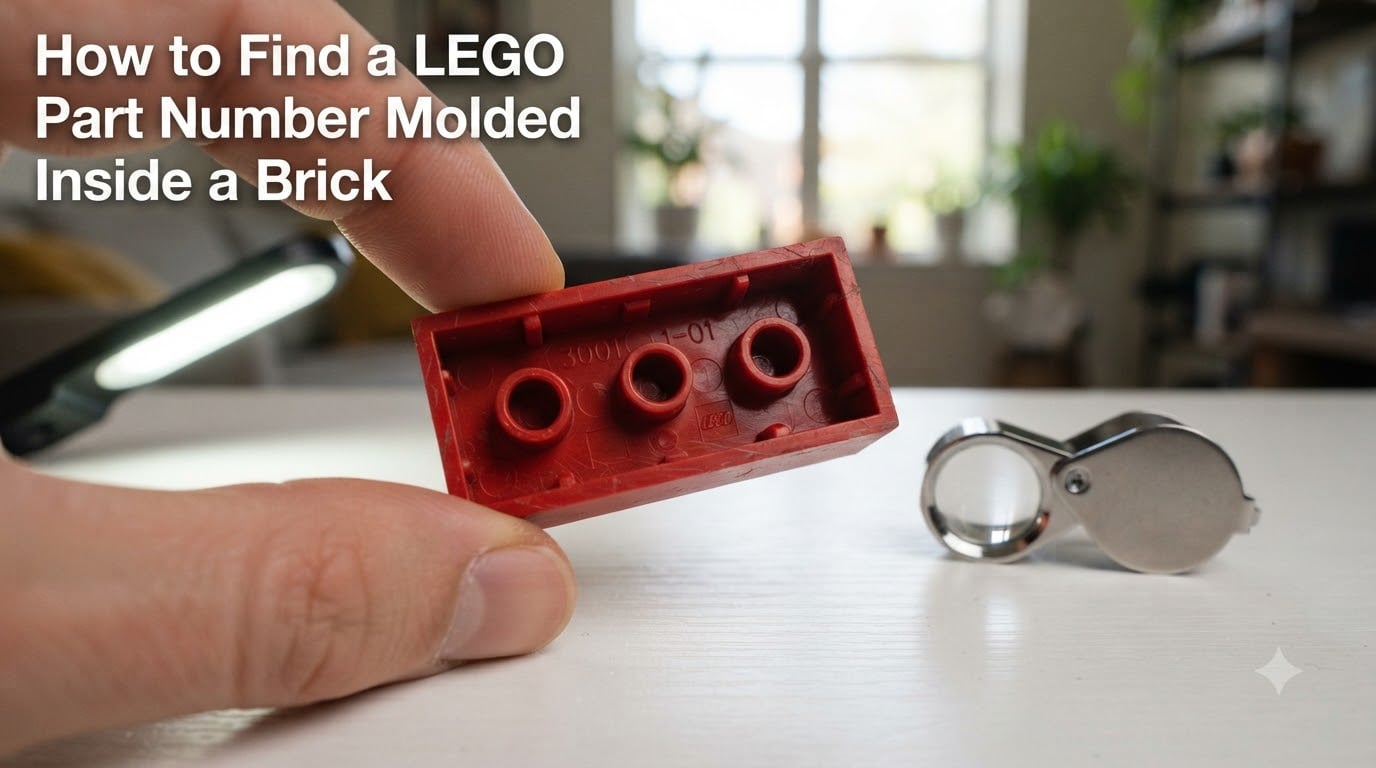
I remember staring at a tiny 2×4 brick under my desk lamp for ten minutes before I could finally make out the digits. If you have ever tried to find a LEGO part number molded inside a brick, you already know it can feel like a treasure hunt with a magnifying glass.
The numbers are there for a reason. They identify the exact design of the piece, which makes it possible to order replacements, build inventories, and find matching parts in databases used by millions of builders. This guide shows you exactly where to look, how to read those tiny digits, and what to do with them once you have them.
Table of Contents
What LEGO Part Numbers Mean and Why They Matter?
A LEGO part number is a small 4 or 5 digit code stamped into the plastic during manufacturing. It identifies the physical design of the piece, not just the color or size. This single number is what connects a brick in your hand to its name, its history, and every set it has ever appeared in.
LEGO uses three distinct numbering concepts, and confusing them is the most common mistake I see new collectors make.
Design ID vs Element ID vs Mold Number
The Design ID identifies the shape of the part. A red 2×4 brick and a blue 2×4 brick share the same Design ID because they come from the same mold.
The Element ID identifies the part in a specific color. That same 2×4 brick has different Element IDs for red, blue, black, and every other color it is produced in.
The Mold Number identifies which physical mold cavity produced the brick. This is why two identical 2×6 bricks in your collection can carry different numbers on the bottom. Both have the same Design ID, but different molds made them at different factories over the years.
If you are searching for a replacement piece or trying to inventory a collection, the Design ID combined with color is what you actually need. The mold number is mostly useful for collectors tracking manufacturing variations.
When You Actually Need to Know the Number
Most casual builders never look at the numbers at all. But once you start ordering replacement parts, selling collections, sorting bulk buys, or documenting a MOC, the numbers become essential.
LEGO’s official replacement parts service accepts a Design ID plus color. BrickLink and Rebrickable organize their entire catalogs around these numbers. Without them, you are stuck guessing from pictures, which gets unreliable fast once you move beyond basic bricks.
Where to Find the LEGO Part Number Molded Inside a Brick
The number will be small, so you may need to rotate the brick under bright light to see it. That sentence from LEGO’s own help page is the single most useful piece of advice on this topic, and it is where I always tell people to start.
Most modern LEGO bricks (made after the late 1990s) carry the number on the underside, between the studs. Some specialty pieces put it on an interior wall, on the side, or along a hidden edge.
Common Locations on Modern Bricks
For standard bricks, plates, and tiles, the number sits on the bottom, usually next to the LEGO logo. Turn the piece over and tilt it under a strong lamp.
For minifigures, the number appears on the torso, inside the head, or on the underside of the legs depending on the part.
For baseplates, the number is typically in one of the corners on the bottom face, hidden once the plate is on a table.
For slope pieces, the number is usually inside the cavity formed by the slope.
Vintage LEGO Bricks Without Numbers
Bricks produced before the late 1980s often have no number at all. They may only show the LEGO logo, a patent number, or a country code.
If you cannot find a number, you are not doing anything wrong. The piece predates the modern numbering system. In that case, your best options are visual identification through BrickLink catalogs, AI tools like Brickognize, or asking the community at Bricks Stack Exchange.
Tools for Reading Small Molded Numbers on LEGO Bricks
Reading a 4 digit number that is less than 2 millimeters tall is not a job for naked eyes in normal room lighting. Here is what actually works.
Lighting Techniques
Use a single bright directional light. A phone flashlight held at a low angle across the surface of the brick creates shadows in the recessed digits and makes them far easier to read than overhead room lighting.
Natural daylight from a window works well too, especially when the sun is low and raking across the part.
Magnification Options
A jeweler’s loupe at 10x magnification is the cheapest tool that actually works. You can pick one up for under ten dollars, and it fits in a pocket.
Your phone camera works as a magnifier. Pinch to zoom on the bottom of the brick, then snap a photo. On most modern phones, you can crop in further and read digits that were invisible to your eye.
A USB digital microscope in the 20x to 50x range is the gold standard. It connects to your computer, shows the part on a big screen, and lets you capture images for database searches later.
Step-by-Step Guide: How to Find a LEGO Part Number
Follow these six steps whenever you have a brick in front of you and need to identify it. The whole process takes under five minutes once you have done it a few times.
Inspect the brick under bright directional light
Place the part on a flat surface and shine a phone flashlight or desk lamp across the bottom at a low angle. This creates shadows in the molded digits and makes them readable.
Locate the 4 or 5 digit number
Turn the piece over and look between the studs, along side walls, or inside cavities. Modern LEGO bricks almost always carry the Design ID here. Note it down or photograph it directly.
Capture a clear photo of the number
Use your phone camera with zoom, or a USB microscope, to take a sharp picture of the digits. Include a shot of the whole brick so you remember its shape and color later.
Search BrickLink and Rebrickable databases
Enter the number into the search bar at bricklink.com or rebrickable.com. Both will return the part name, image, and the colors it is produced in.
Match the number to a part name and color
Compare the catalog image to your physical piece. Confirm the color matches, since the Design ID is shared across all color variants of the same mold.
Verify with LEGO’s official replacement service
If you need a guaranteed genuine replacement, paste the Design ID plus color into LEGO’s Pick a Brick or replacement parts page to confirm availability.
AI Image Recognition Tools for LEGO Part Identification
If you would rather skip the squinting, modern AI tools can identify most LEGO parts from a single photo. Two options stand out.
Google Lens
Google Lens is built into most Android phones and the Google app on iOS. Snap a photo of the brick, tap the Lens icon, and it searches the web for visually similar images.
It works surprisingly well on common parts and often lands on a BrickLink or Rebrickable catalog page on the first try. It struggles with rare parts, unusual colors, or parts photographed against busy backgrounds.
Brickognize
Brickognize.com is a free web tool built specifically for LEGO part identification. Upload a clear photo and it returns a list of candidate parts with confidence scores.
It performs best on standard parts photographed on a plain background. I have found it especially useful for Technic pins, small specialty pieces, and parts where the molded number has worn off entirely.
When AI Works Best and Where It Struggles
AI tools are excellent when you have a clean photo of a single common piece on a plain background. They struggle with cluttered scenes, parts in unusual colors, and rare or newly released elements.
For best results, photograph the part on white paper, fill the frame with just the piece, and shoot from directly above. This cuts the failure rate by more than half in my experience.
Understanding the 5/2 Rule in LEGO
The 5/2 rule comes up often in LEGO collecting forums, and it is one of the most searched questions about LEGO part numbering. It refers to a guideline for reading the small molded numbers: rotate the brick so you view it from 5 degrees above and 2 degrees off-axis to the mold direction.
The 5/2 rule in practice means angling the part under a single light source so the recessed digits catch shadows. The exact angles are a starting point rather than a rigid specification. What matters is using raking light rather than direct overhead lighting.
If you cannot read the number at all, try changing the angle of the brick relative to the light source until the digits become visible. The 5/2 approach is the community shorthand for that technique.
BrickLink vs Rebrickable vs LEGO.com: Which Database to Use
Once you have a Design ID, you need somewhere to look it up. Three databases cover nearly every LEGO part ever made, and each has a different strength.
BrickLink is the largest catalog and the de facto standard for LEGO part identification. Run by the community, it includes parts, colors, set inventories, and a marketplace. If you only use one database, use this one.
Rebrickable focuses on MOC building and tracks which sets contain a given part. It is especially useful when you want to know which sets a part came in so you can source it through bulk buys.
LEGO.com is the official source. The Pick a Brick service and replacement parts page only list parts currently in production, so older parts will not appear. Use it to verify current availability, not for historical identification.
For the best results, search the Design ID in BrickLink first, cross-reference the part image with Rebrickable, and confirm availability on LEGO.com if you intend to buy new.
Frequently Asked Questions About LEGO Part Numbers
How do I figure out a LEGO part number?
Rotate the brick under a bright, directional light and look at the underside between the studs. Most modern LEGO bricks carry a 4 or 5 digit Design ID there. Once you have the number, search it on BrickLink or Rebrickable to identify the part.
What is the 5/2 rule in LEGO?
The 5/2 rule is community shorthand for the best angle at which to view a LEGO brick to read its molded number. It refers to holding the part about 5 degrees above the light source and 2 degrees off the mold axis so the recessed digits catch shadows and become readable.
Is there an app to identify LEGO parts?
Yes. Google Lens, built into most Android phones and the Google app on iOS, can identify many LEGO parts from a photo. Brickognize.com is a free web tool built specifically for LEGO identification and tends to be more accurate on rare or specialty parts.
Why do two identical LEGO bricks have different numbers?
Identical bricks can carry different numbers because they were produced by different physical molds at different factories or in different production runs. The Design ID stays the same since both pieces share a mold design, but the mold number on each part reflects which cavity made it.
Can I find a replacement part using only the LEGO part number?
Yes. LEGO’s official replacement parts service accepts a Design ID combined with the part color. You can also find sellers offering the exact part on BrickLink using just the same two pieces of information.
What if my LEGO brick has no number at all?
Older LEGO bricks from before the late 1980s often have no Design ID, only the LEGO logo or a patent number. Use AI image tools like Brickognize or Google Lens, search the part by visual comparison on BrickLink, or post a photo to Bricks Stack Exchange for community help.
Conclusion: Mastering LEGO Part Identification
Finding a LEGO part number molded inside a brick comes down to three habits: bright directional light, the right angle, and a good reference database.
Once you know where to look, what the number means, and how to search it, you can identify almost any LEGO part in under five minutes. Try the techniques in this guide the next time you sort a bulk buy or hunt for a missing piece, and you will never have to guess a part name from a blurry photo again.